


A marketing asset library is a centralised hub where your agency stores every logo, video, banner, social template, and ad — all in one searchable place your whole team can access.
Without one, the cracks show fast. A designer spends twenty minutes hunting for the approved logo because it might be on Google Drive, someone’s laptop, or buried in an email thread. A social media manager posts last season’s product image because it looked close enough. A sales rep sends a pitch deck with outdated pricing. Everyone waits for someone to forward a file — or recreates assets that already exist somewhere.
A marketing asset library fixes this. It gives every team member, whether internal or freelance, one place to find, download, and use the right file every time.
If your agency already runs on WordPress, you can build one directly on your existing site using Filr — no separate SaaS subscription required. For a broader look at managing files in WordPress, see our guide to WordPress document libraries.
What is a marketing asset library?
A marketing asset library is a structured repository for all your brand and campaign files. It covers images, logos, ad banners, social media templates, video ads, brand guidelines, and media kits — any file your team uses across PR, social media, and digital marketing channels.
The concept sits within the broader category of digital asset management (DAM), which covers the systems and processes organisations use to organise and distribute digital files. A WordPress-based marketing asset library gives you the core benefits of DAM without switching platforms.
Industry research from 2025 suggests marketing teams can spend up to a quarter of their time searching for files they know exist (Filecamp, 2025). A well-structured asset library eliminates that search time entirely.
Key benefits for agencies:
- Brand consistency — only approved, current files are available, so every team member works from the same source of truth
- Faster workflows — team members find what they need in seconds instead of digging through scattered folders
- Less rework — centralised assets with clear version labels mean nobody recreates a file that already exists
- Controlled access — restrict sensitive or licensed files to specific roles or team members
How to build a marketing asset library in WordPress using Filr
Filr is a WordPress plugin that lets you create a frontend-facing file library with download links, organised by category. Available since 2020, Filr supports individual and bulk file uploads, named libraries, file encryption, and file expiration — all from your existing WordPress admin.
Here’s what you need:
- A WordPress website
- Your agency’s media assets (images, videos, brand kits, etc.)
- The Filr plugin
Step 1: Install the Filr plugin
Filr lets you upload assets, organise them into libraries, and publish a table layout on the front end. It also includes file encryption and file expiration features, which prevent unauthorised access to assets automatically.
Install Filr, then click Activate to get started.
Step 2: Create your asset libraries
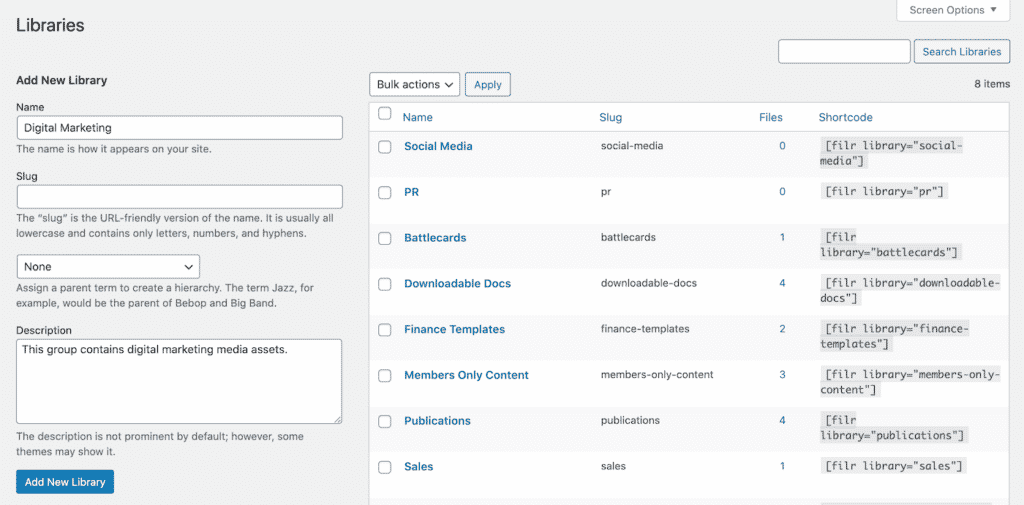
Libraries act as top-level categories. As an agency, consider naming them by channel: PR, Social Media, and Digital Marketing map directly to how your team works and make it obvious where to look.
To create a library, go to Filr > Libraries in your WordPress admin. Enter a name and description, then click Add New Library. The library shortcode appears on the right — copy it. You’ll use it in step 4.
Step 3: Add your media assets
Before uploading, agree on a naming convention. A consistent format prevents confusion as the library grows. A good file name combines the asset type, a specific identifier, the version, and the year — for example, logo-primary-v2-2025.png or banner-instagram-summer-v1-2025.mp4.
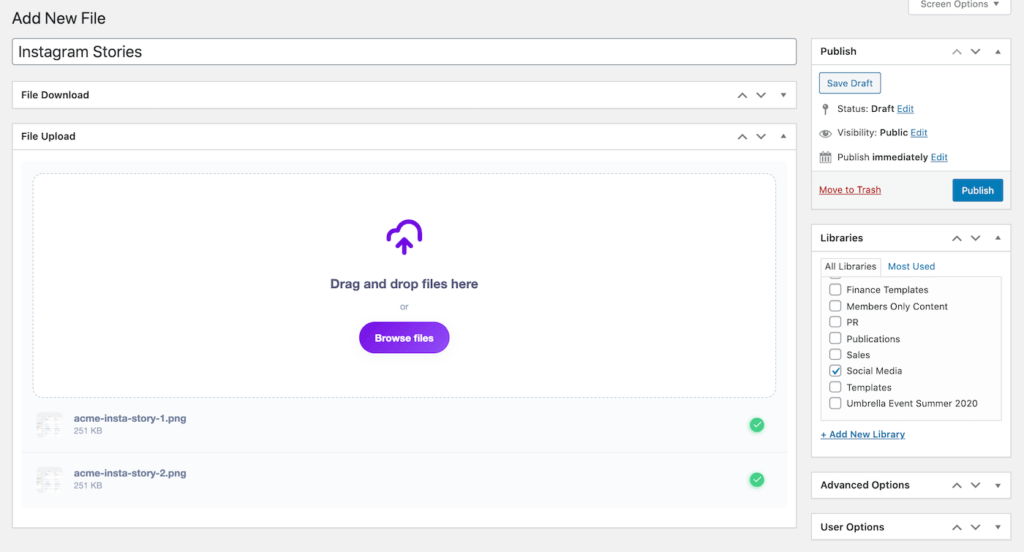
To upload, go to Filr > Add New, give the file a name, and use the File Upload meta box. Once uploaded, assign the file to the correct library using the Libraries meta box on the right, then click Publish.
Step 4: Publish the library on a page
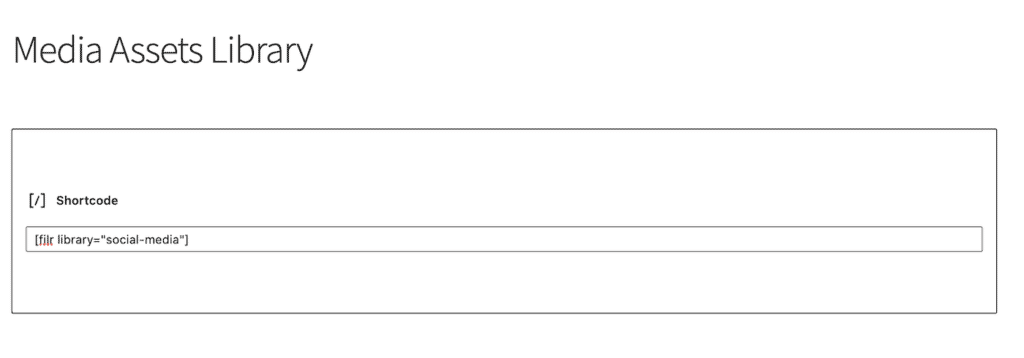
Go to Pages > Add New in your WordPress dashboard. Add a Shortcode block, paste the library shortcode you copied in Step 2, then click Publish.
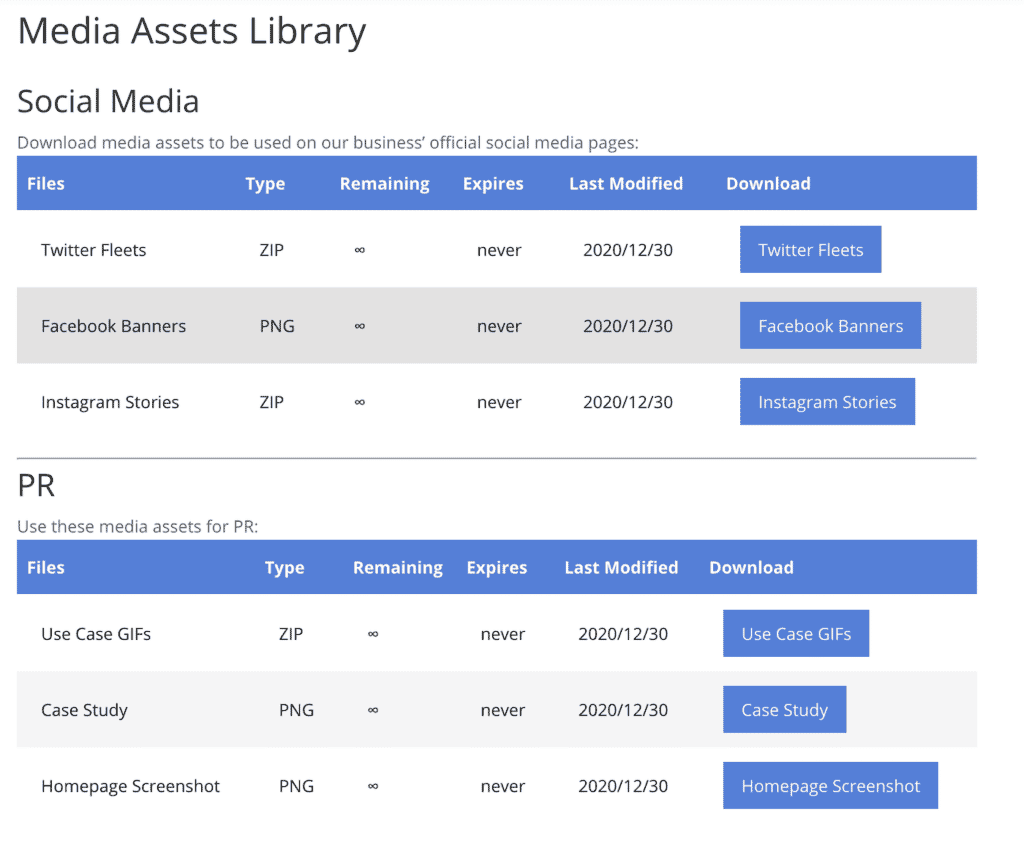
The published page shows a clean table listing all assets in that library, with a Download column users can click to grab individual files.
You can also publish multiple libraries on one page by adding a shortcode block for each one — useful for showing PR, Social, and Digital Marketing assets side by side.
To adjust how the library looks, head to Filr > Settings > Libraries to customise colours and table style.
Step 5: Restrict access to your marketing asset library
Once the library is live, control who can see it. Passster is a companion WordPress plugin that adds content protection directly to your WordPress pages.
Passster gives you four ways to lock down access: password protection, CAPTCHAs, role-based access control, and link-based unlocking. Authorised team members and approved freelancers get in; everyone else gets blocked. Check out 6 Different Ways to Restrict Content in WordPress for step-by-step instructions.
Wrapping up
A marketing asset library gives your agency a single source of truth for every logo, banner, and campaign file. Team members stop wasting time searching for assets — and stop accidentally using the wrong ones.
Building one in WordPress takes five steps using Filr: install the plugin, create channel-based libraries, upload assets with consistent file names, publish each library on a page, and lock access with Passster. The whole setup runs on the WordPress install you already have — no new SaaS tool or separate login required.
Filr handles the asset display and download layer while Passster handles the access control. Together, they cover what a standalone digital asset management platform would cost hundreds of dollars a year to provide.
Frequently Asked Questions
Media assets are the rich media files your agency uses in marketing, branding, and communication. Examples include images, logos, ad banners, social media templates, video ads, audio files, brand guidelines, and media kits. Essentially, any visual or auditory file used to represent your brand counts as a media asset.
A digital asset management (DAM) system is the enterprise-grade platform that manages the full lifecycle of digital files — metadata, version control, rights management, and distribution. A media asset library is a simpler, more focused implementation of the same idea: a centralised repository for storing and sharing brand files. WordPress-based libraries built with Filr give agencies the core benefits of a DAM (organised access, download links, access control) without the complexity or cost of a standalone SaaS platform.
No. If your agency already runs a WordPress site, you can build a marketing asset library using the Filr plugin installed directly on that site. Passster handles access control. Neither requires switching to a separate SaaS tool.
Use Passster alongside Filr. Passster lets you restrict the page containing your asset library by password, user role, or a unique link — so only the team members and freelancers you authorise can view and download files.
Filr supports any file type WordPress allows — images (JPG, PNG, SVG), video files (MP4), PDFs, ZIP archives, and more. For file types WordPress blocks by default (such as SVG), you can enable them via a plugin or filter.
Build Your Agency Asset Library Today
A WordPress asset library for your agency needs client-level access control, a clean upload workflow, and support for every file type your team shares. Filr delivers all three, with password, role, or link-based access so freelancers and clients see only what they should.
Ready to give your team one source of truth for brand files? Get Filr and build your agency’s asset library today.